If you’ve ever hosted a session where people are technically present but mentally scrolling somewhere else, you already know the real challenge: attention is fragile. Whether it’s a packed conference hall, a webinar with 500 attendees, or a hybrid town hall where half the audience is on mute—engagement doesn’t “just happen.” It has to be designed.
The good news: you don’t need a hyper-entertaining keynote to keep people involved. You need a few smart interaction moments, the right format, and tools that make participation effortless (QR codes, live questions, quick polls, reactions, and visual feedback that everyone can see).
Interactive Presentation Ideas for You
Interactive presentations work best when you create small, frequent participation moments instead of one big “Q&A at the end.” Think of engagement like checkpoints—every 3–7 minutes, you pull the audience back in with a prompt, a decision, a vote, or a quick reaction.
Here are 8 practical ideas you can use in events, webinars, and conferences:
1) Start with a “pulse check” (first 60 seconds)
Your opening minute decides whether people lean in or lean out. Instead of starting with your agenda slide, start with a question that’s easy to answer:
- “What brings you here today?” (options-based)
- “How familiar are you with this topic?” (rating scale)
- “Where are you joining from?” (short text)
Why it works: It breaks the silent wall, tells the audience participation is expected, and gives you instant context to tailor your examples.
Pro tip: Show results live and react to them in the moment (“Looks like 40% are new—great, I’ll keep jargon light.”).
2) Use “Choose our path” moments
Instead of presenting one linear storyline, offer choices at 2–3 points in the session:
- “Do you want to go deeper into Strategy or Execution?”
- “Should we spend more time on examples or templates?”
- “Which use case fits you: A, B, or C?”
Why it works: People pay more attention when they feel they’re shaping the session.
How to run it: Keep the options limited (2–3 max). Announce the next section based on what wins. Even if you planned it anyway, the audience feels ownership.
3) Turn Q&A into a live “upvote board”
Traditional Q&A is often dominated by the boldest mic-grabbers. A better format:
- Let attendees submit questions digitally
- Let others upvote the ones they want answered
Why it works: It surfaces the most relevant questions and encourages quieter attendees to participate. Tools like Slido specifically support audience Q&A with upvoting and anonymity.
Bonus: You can collect questions throughout the talk, not just at the end.
4) Run a “myth vs reality” mini-quiz
Great for webinars and conferences where attention drops mid-session.
- Put 3 statements on screen
- Ask: “True or false?” or “Which one is correct?”
- Reveal answers with a quick explanation
Why it works: Quizzes turn passive listeners into active thinkers. Slido and Mentimeter both support quizzes and live interaction styles like polls/quiz formats.
Make it feel human: Add one funny option or a very relatable misconception.
5) Create a “1-minute workshop” inside your talk
Stop presenting and give a tiny action:
- “Write your current biggest challenge in one line.”
- “Pick one KPI you want to improve this quarter.”
- “Draft your first line of an email subject.”
Then show a few responses (anonymously) and comment on patterns.
Why it works: People love seeing that others share the same problems. It also makes your talk feel tailored, not generic.
6) Use live reactions—without letting it get chaotic
Quick emoji reactions can keep energy up:
- “If this resonates, drop a ”
- “If you’ve tried this, hit ”
- “If this is new, drop ”
Why it works: It’s low effort, high frequency, and helps you gauge understanding instantly.
Rule: Don’t ask for reactions every minute—use it as a “beat” after key moments.
7) Add a “Spotlight moment” for attendees
If you’re running events/conferences, give attendees their moment:
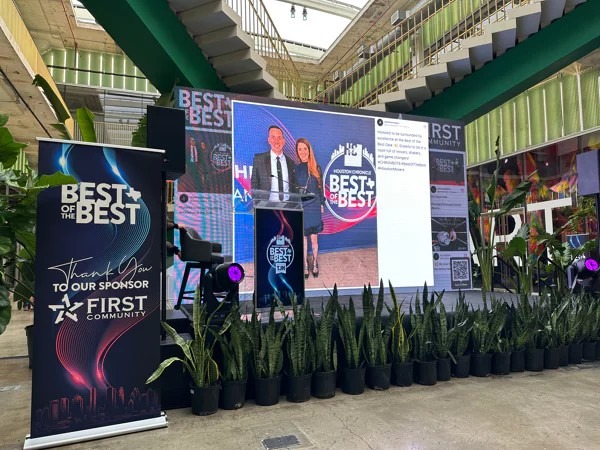
- Ask them to post a photo, takeaway, or quote with your event hashtag
- Display it live on a screen/social wall
- Highlight a few posts during breaks or between sessions
Why it works: People engage harder when they might get featured. It also creates shareable content for your event brand.
8) End with a commitment + instant takeaway
Instead of “Any questions?” end like this:
- Ask: “What’s the one thing you’ll implement this week?”
- Share a resource based on common answers (template, checklist, slides)
Why it works: People leave with a decision, not just information. Your session becomes memorable because it leads to action.
Best Audience Engagement Tools
The best audience engagement tools remove friction. Attendees should be able to join in seconds (QR or link), participate without downloading anything, and see results live. For organizers, the tool should make moderation easy, support hybrid audiences, and provide analytics you can use after the session.
1) Social Walls
Social Walls helps you display live content from social platforms on screens during events—great for conferences, launches, award nights, and brand activations. It’s designed to drive participation by making attendee posts, reactions, and updates visible in real time.
Key features:
- Live Social Media Wall – Collect and display real-time social posts to keep event screens fresh and interactive.
- Live Polls & Q&A – Enable attendees to vote, ask questions, and share opinions during sessions.
- QR Code to Screen (SnapUp) – Allow attendees to upload content directly to screens without posting on social media.
- Leaderboards & Engagement Analytics – Highlight top contributors and track engagement, impressions, and sentiment.
- Digital Photobooth & Hashtag Slideshows – Encourage fun participation and visually showcase attendee-generated content.
- Live reactions to make the wall feel interactive, not just decorative.
- AI moderation to filter unwanted content and keep things brand-safe.
- Instant updates so content appears quickly during the event.
Benefits (why organizers like it):
- Creates a “participation loop”: people post → they appear on screen → they post again
- Boosts social buzz without forcing everyone into one app
- Fills dead time (entry, breaks, transitions) with content that feels alive
- Makes sponsors happier when their hashtag/activity shows up visibly in the venue
- Increases audience participation throughout the event
- Turns passive attendees into active contributors
- Creates real-time social buzz and shared experiences
- Helps organizers measure engagement and improve future events
- Works seamlessly for in-person, virtual, and hybrid events
Best for: In-person and hybrid conferences, brand events, campus fests, community meetups, award nights—anywhere you have screens and want energy.
2) Slido (Live Q&A, polls, quizzes—great for webinars + conferences)
Slido is built for making sessions interactive through live polls, Q&A, quizzes, word clouds, and analytics—and it’s widely used for meetings, conferences, and webinars.
Key features:
- Live polls including multiple choice, ranking, rating, open text, word cloud, etc.
- Audience Q&A with anonymity and upvoting so the best questions rise to the top.
- Quizzes to add fun and retention, not just feedback.
- Analytics to understand participation and export insights.
- Works with common presentation/video tools (PowerPoint, Teams, Zoom, etc.)
Benefits:
- Better Q&A quality, less random mic hogging, more real questions.
- Higher participation because joining doesn’t require logins/downloads.
- More inclusive for shy audiences or large rooms
- Easy for hybrid remote and in-room attendees can interact equally
Best for: Webinars, panel discussions, keynotes, town halls, internal all-hands.
3) Mentimeter (Interactive presentations with polished visuals)
Mentimeter is a popular interactive presentation platform that helps you run live polls, quizzes, Q&A, surveys, and word clouds—and it’s strong for sessions where you want clean, visual participation moments.
Key features:
- Live polling + audience interaction formats like word clouds, quizzes, Q&A, surveys
- Built for interactive presentations you can run end-to-end (not just “add-on” polls)
- Integrations for common meeting environments (useful for internal webinars)
Benefits:
- Makes participation look beautiful on screen (important for big events)
- Helps you collect feedback without awkward pauses
- Great for workshops where you want structured interaction every few minutes
Best for: Workshops, training, strategy offsites, conference breakouts.
4) Poll Everywhere (Quick interactive activities inside your slides)
Poll Everywhere is a web-based audience response system designed to add interaction—like polls, word clouds, and Q&A—directly into presentations, so you don’t have to switch tools mid-talk.
Key features:
- Multiple activity types (polls, word cloud, Q&A)
- Audience can respond from their devices (web link; also supports SMS in some flows)
- Integrations like Google Slides support interactive elements inside decks
Benefits:
- Keeps your session flowing—no “now open another tab” energy
- Works well when you need fast check-ins (comprehension, votes, decisions)
- Great for presenters who want interaction but don’t want a complex setup
Best for: Corporate presentations, education-style sessions, webinars with slide-based delivery.
5) Vevox (Polling + Q&A with strong PowerPoint/Teams usage)
Overview: Vevox focuses on live polling, word clouds, and Q&A to help you create discussion and participation, often used in meeting/training environments.
Key features:
- Real-time polling and engagement formats
- Word clouds designed for live brainstorming and sentiment capture
- Q&A style engagement to support inclusive participation
Benefits:
- Great for sessions where you want people to contribute ideas quickly
- Helps quieter attendees participate comfortably
- Works well for training, internal events, and structured workshops
Best for: L&D teams, internal town halls, training-heavy conferences.
6) AhaSlides (Fun, lightweight engagement for meetings and workshops)
AhaSlides is an interactive presentation tool that brings live polls, quizzes, word clouds, Q&A, surveys, and analytics into a simple workflow.
Key features:
- Polls + brainstorm formats to get instant opinions and feedback
- Quizzes with multiple game-like formats
- Q&A with moderation options (helpful for larger groups)
- Analytics to understand participation
Benefits:
- Keeps energy high without needing a “host personality”
- Great for team sessions where you want participation without complexity
- Useful when you want a mix of serious feedback + fun moments
Best for: Team meetings, community sessions, workshops, smaller conference breakouts.
Conclusion
Engagement isn’t about forcing people to talk—it’s about giving them easy, natural ways to participate. If you plan a few interaction beats (pulse checks, upvoted Q&A, mini-quizzes, quick workshops) and pair them with the right tools, your sessions stop feeling like broadcasts and start feeling like conversations.
A simple way to choose:
- Need visual buzz + attendee spotlight, Q&A + polls on big screens? Start with Social Walls.
- Need only Q&A + polls for webinars and conference sessions? Slido is a strong pick.
- Want polished interactive slides? Go for Mentimeter.
And whatever tool you choose—remember: the tool is only the microphone. The real magic is how often (and how thoughtfully) you invite your audience to use it.