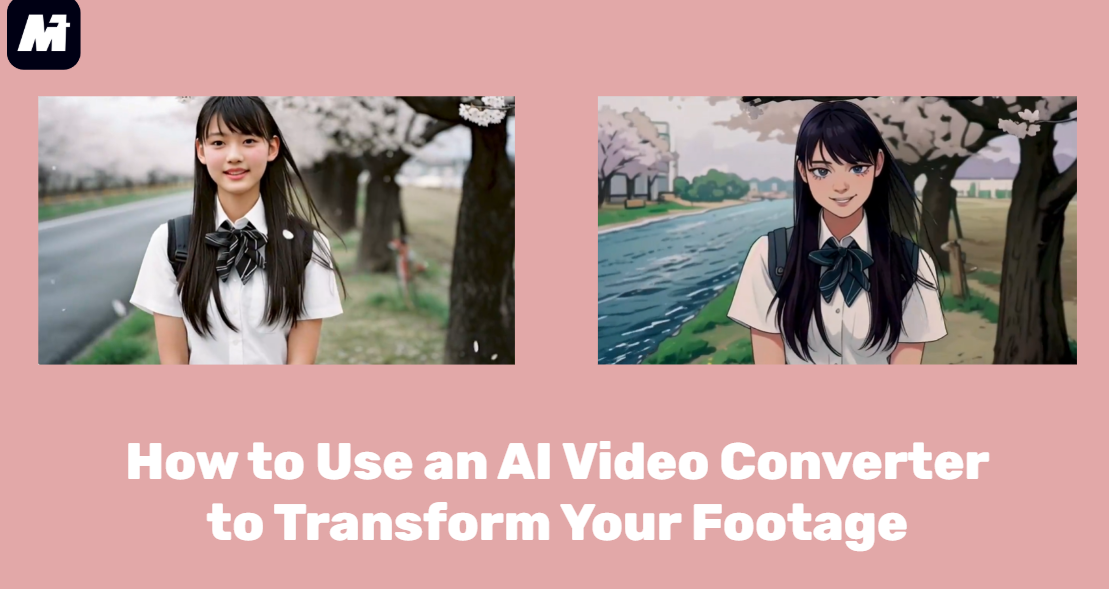
How to Use an AI Video Converter to Transform Your Footage
The world of video creation is evolving rapidly, and the ability to transform or reinterpret footage using AI is becoming indispensable. Whether you’re editing marketing videos, social clips, tutorials, or animations, an AI video converter can upgrade the look, style, or clarity of your content instantly.
In this guide, you’ll learn how to use Media.io to convert ordinary videos into visually enhanced, AI-generated content. If you’ve been searching for an AI video generator free online or comparing different tools for re-styling footage, this walkthrough will show you how to begin with confidence.
What Is an AI Video Converter?
An AI video converter processes your input footage and transforms it into a new version using machine-learning models. AI models can:
- enhance clarity
- restyle visuals
- improve lighting
- apply artistic or cinematic tone
- reinterpret motion or texture
This goes far beyond traditional editing. While a regular converter changes file formats, an AI-powered system changes how your video looks and feels. Tools categorized as an AI video-to-video generator can rebuild scenes based on depth, lighting, and motion cues, creating an upgraded or stylistically different output.
Why Media.io Is the Best AI Video Converter
WonderShare Media.io operates as a full audio-video creation platform powered by multiple large models, giving it far greater depth than a typical converter. Instead of simply changing file formats or applying basic filters, it uses advanced motion analysis, style modeling, and enhancement engines to reinterpret your footage with professional detail.
The platform also integrates scriptwriting, voice generation, face animation, and video enhancement, allowing you to build complete projects in one place. This combination of multi-model intelligence and an all-in-one creative ecosystem makes Media.io far more flexible, capable, and future-ready than standard video converters.
- Multi-Model Transformation Capabilities
Media.io uses visual diffusion models, motion analysis engines, and enhancement tools to generate high-quality AI output. It can convert everyday footage into stylized, artistic, or cinematic sequences.
- 5000+ Visual Templates
Unlike typical AI video generator free online platforms, Media.io lets you embed your converted clips into 5000+ templates for ads, explainers, reels, educational videos, or brand content.
- Complete AI Creation Suite
Inside the same workspace, you can also use:
- AI Script Generator
- AI Voice Studio
- AI Face Swap
- AI Text-to-Video
- AI Talking Avatar
- AI Video Enhancer
This multi-tool ecosystem helps you create full AI-generated video projects without juggling multiple apps.
- Creator-Driven Discovery Experience for Effortless Content Production
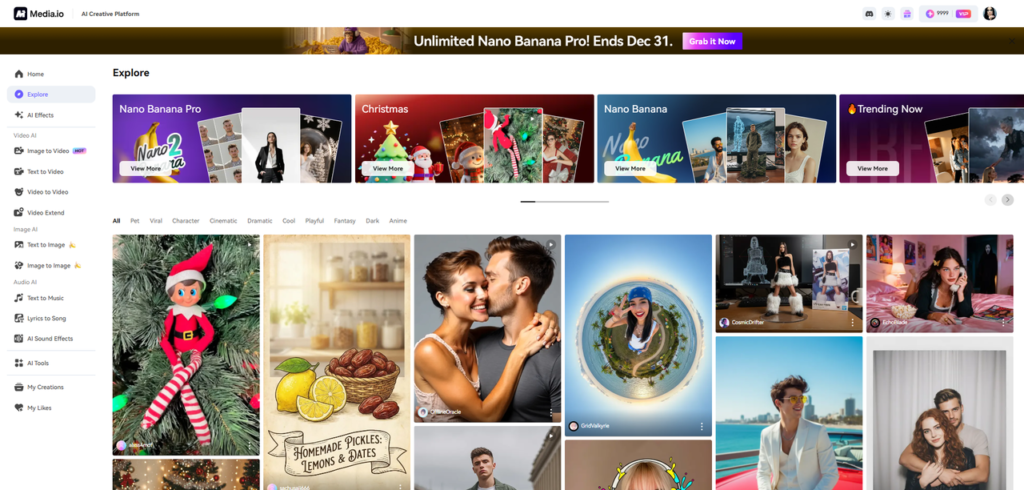
The Explore Community showcases a vibrant mix of user posts and ready-made templates that accelerate your creative process. Every design can be duplicated through the “Generate Similar” option powered by AI. Trend filters also make it easy to jump straight into the styles currently dominating social platforms.
- Daily Credits for Logged-In Users
Creators receive daily credits to test different styles and transformations—perfect for experimentation and content scaling.
How to Convert a Video Using an AI Video Converter
Step 1. Upload Your Footage
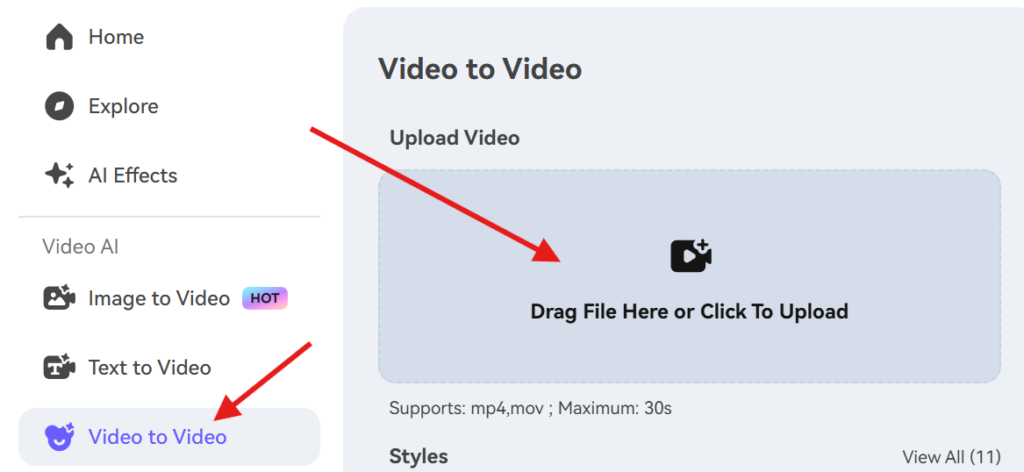
Go to the Media.io Video to Video page and upload your clip. It can be a product video, personal vlog, animation draft, demo footage, or training material. The AI will analyze motion, edges, lighting, and color.
Step 2. Choose a Style or Enhancement Model
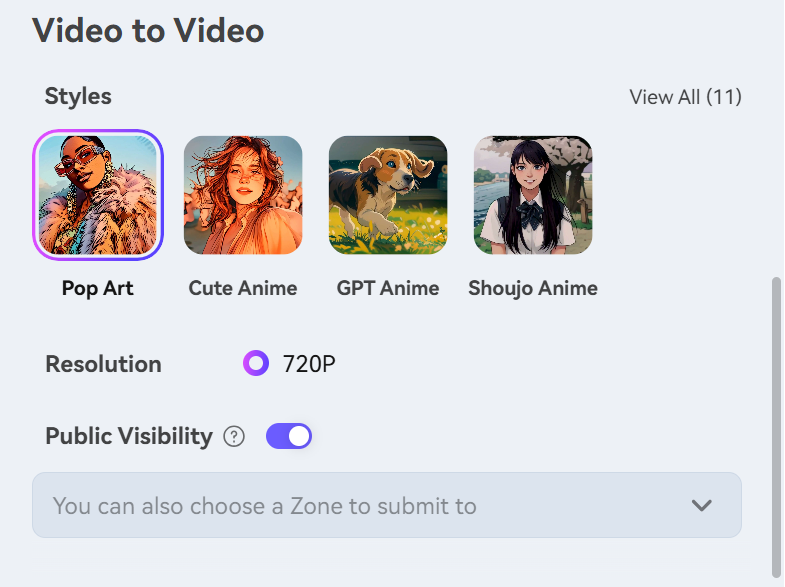
You can choose from several AI-driven styles or enhancement modes:
- realistic cinematic upgrade – enhances lighting, depth, and motion to give your footage a polished, film-like appearance.
- artistic or stylized effects – transforms your video into a creative visual style such as sketch, painting, anime, or surreal looks.
- motion smoothing – reduces jitter and stabilizes movement for a cleaner, more professional flow between frames.
- color mood transformations – adjusts tones and contrast to create specific emotional atmospheres or thematic color palettes.
- detail enhancement – sharpens textures and restores subtle visual elements to make your footage appear clearer and more defined.
Step 3. Generate the AI-Enhanced Video
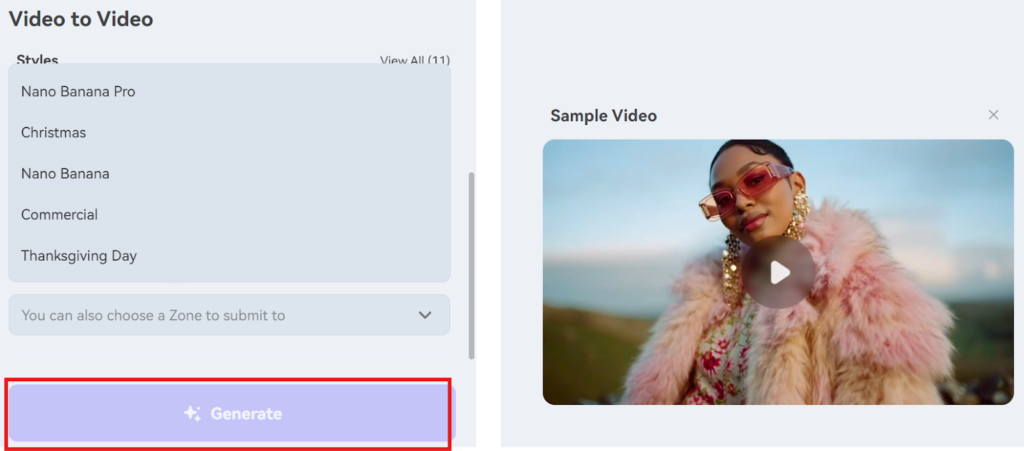
Click “Generate”, and the large-model engine reconstructs your video, applying style transformation and visual improvement. This is how Media.io functions as an AI video-to-video generator, rebuilding frame sequences based on your chosen style.
Step 4. Edit or Extend Your Clip
Enhance your converted footage with:
transitions
text overlays
branding
templates
pacing adjustments
additional AI scenes
This allows you to create full AI-generated video sequences rather than isolated clips.
Step 5. Export or Build a Complete Video
When you’re satisfied, export your video or assemble multiple clips inside a template for a finished project—perfect for ads, e-learning, social content, or business storytelling.
Use Cases for AI Video Converters
- marketing and promotional videos
- upgraded brand visuals
- smoother talking-head content
- animated explainers
- stylized social clips
- re-imagined creative projects
Conclusion
An AI video converter allows you to transform, enhance, and reinterpret your videos with minimal effort. Media.io’s multi-model engine, template library, and integrated editing tools make it far more capable than a typical online converter. If you want to restyle your footage or build full AI-powered video projects, Media.io offers a strong foundation for creativity and experimentation.