Running a business today is complex. Teams work from home, offices, and everywhere in between. Data breaches are rising. Deadlines are tight. In this environment, employee monitoring software has become a must-have tool not a luxury.
The right employee monitoring tool helps you see how work gets done, where time goes, and how to keep your team productive and secure. This guide breaks it all down simply — for business owners, HR professionals, and IT managers who want clear answers.
What Is Employee Monitoring Software?
Employee monitoring software tracks what employees do on company devices during work hours. It records things like websites visited, apps used, time spent on tasks, and screen activity.
It is also called workforce monitoring software or bossware. But today’s tools are far more than spy software. They help managers make smarter decisions, spot problems early, and support their teams better.
Modern employee tracking software creates a transparent work environment. Employees know what is tracked. Managers get the data they need. Everyone stays on the same page.
Key Features to Know
A good employee monitoring tool gives you useful, real-time data. Here are the features that matter most:
- Time Tracking: Records when employees start, stop, and take breaks. You get a clear picture of hours worked and time wasted.
- Screen Monitoring Software for Employees: Takes screenshots at set times. Managers can check what employees worked on — without hovering over them.
- Activity Logging: Tracks which apps and websites employees use. It builds a clear record of daily activity.
- Keystroke Logging: Captures keyboard input. This helps with security checks and policy enforcement.
- Idle Time Tracking: Flags when employees are inactive. This helps separate productive time from downtime.
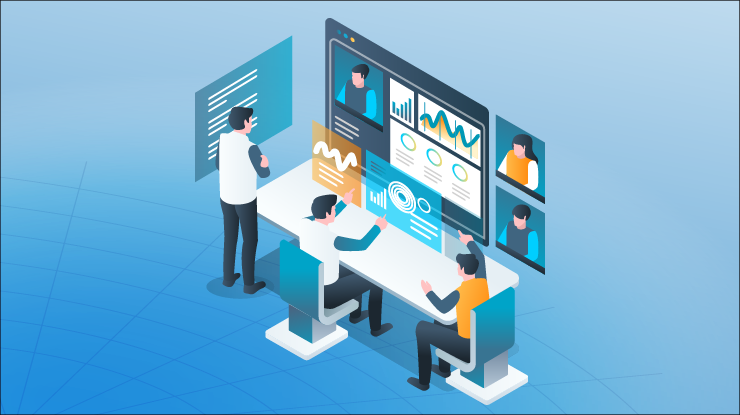
- Workforce Productivity Analytics: Turns raw data into easy reports. Managers can spot trends and make better decisions fast.
Together, these features support strong user behavior analytics — so you lead with data, not guesswork.
Benefits for Employers and Employees
Employee computer monitoring software helps both sides of the table. Here is how:
- Higher Productivity: Employees stay more focused when they know activity is tracked. Work gets done faster and better.
- Better Remote Work Management: Managing remote teams is hard. Remote employee monitoring software closes the gap. You see what your team does — no matter where they are.
- Lower Costs: Find out where time is wasted. Fix it. You save money without cutting headcount.
- Stronger Security: Insider threat detection and data loss prevention (DLP) features catch problems before they grow. Sensitive files stay protected.
- Cleaner Project Tracking: Log time per task or project. This makes billing accurate and resource planning simple.
Privacy, Compliance, and Ethics
Many people ask: is it legal for employers to monitor employee computers?
In most countries, yes — it is legal. But you must follow the rules. Tell employees what you track. Limit monitoring to work devices and work hours. Follow laws like GDPR, HIPAA, or your local labor regulations.
Good employee monitoring software makes compliance easy. It includes HIPAA compliance monitoring, privacy controls, and full audit logs. These tools show that your monitoring is ethical and documented.
Be open with your team. Tell them what is tracked and why. When employees understand the purpose, trust grows — it does not break.
Real-World Use Cases
Remote Teams: A software company uses remote employee monitoring software to track hours and app usage. Managers see who is working and on what. No micromanaging needed.
Finance and Healthcare: These industries face strict regulations. Teams use insider threat detection and data loss prevention to flag unauthorized file access. Screen captures create audit trails for compliance reviews.
Field Workers: Companies with on-site staff use geofencing for employees. Workers clock out automatically when they leave a job site. Location is verified without phone calls or manual logs.
Freelancers and Agencies: Clients want proof of work. Employee time tracking software with screenshots shows exactly what was done and when. Disputes drop. Trust rises.
How to Pick the Right Software
Choosing the best employee monitoring tool comes down to a few key questions:
- What do you need it for? Define your goal first. Is it productivity, security, compliance, or remote work accountability? Your answer shapes everything else.
- Will it scale? Pick software that grows with your team — from 5 employees to 500.
- Does it connect with your tools? Look for integrations with Slack, Microsoft Teams, HR systems, and payroll apps.
- Is it easy to use? If managers and employees find it confusing, adoption fails. Choose a clean, simple interface.
- Does it protect privacy? You need controls to limit what gets tracked. This matters especially for hybrid teams.
- Is support reliable? Choose a vendor with fast, helpful support. Top picks include Hubstaff, ActivTrak, Teramind, Insightful, and Time Doctor.
FAQs
Q1: What does employee monitoring software do?
It tracks employee activity on work devices. This includes time worked, websites visited, apps used, and screen activity. It helps businesses run more efficiently and keeps data safe.
Q2: Is it legal to monitor employees?
Yes, in most countries. You must tell employees what you track. You must also follow local laws like GDPR or HIPAA. Written policies are essential.
Q3: Can it track remote workers?
Yes. Remote employee monitoring software is built for distributed teams. It tracks hours, screen activity, and productivity — no matter where employees work.
Q4: Will monitoring hurt employee trust?
Not if you are open about it. Tell your team what is monitored and why. When employees understand the goal, an employee monitoring tool builds accountability — not resentment.
Q5: What is the difference between monitoring and surveillance?
Monitoring track work activity to improve performance. Surveillance implies watching employees beyond work tasks. Good workforce monitoring software stays within ethical and legal limits work devices, work hours, work purposes only.
Q6: What features should I prioritize?
Start with time tracking, screen monitoring software for employees, and workforce productivity analytics. Add data loss prevention and HIPAA compliance monitoring if you work in a regulated industry.
Q7: Is there free software for small businesses?
Yes, some tools offer free plans. But free employee monitoring software for small businesses often has limited features. A paid plan gives you better reporting, more users, and stronger support as you grow.
Q8: How does monitoring improve data security?
Employee monitoring software with insider threat detection sends alerts when sensitive files are accessed or moved without permission. It creates a security layer that protects your business from the inside out.
Conclusion
Employee monitoring software is not about distrust. It is about clarity.
When you know how work happens, you can improve it. You can protect your data, support your team, and manage remote workers with confidence. The right employee monitoring tool gives you that clarity without invading privacy or breaking trust.
Keep your policies transparent. Choose software that fits your team’s size and goals. And remember — the best monitoring is the kind that helps everyone do their best work.
Start exploring employee tracking software today. The right tool is out there and it could change how your business operates.