Construction companies don’t need another piece of software creating more noise during the day. They need cleaner control over the work already happening. Jobs move fast, costs shift, crews need answers, vendors send invoices, change orders stack up, and leadership still needs a reliable view of where the business stands. That’s a lot to manage when the company is relying on spreadsheets, separate accounting tools, email threads, field updates, and reports that arrive too late to help.
The pressure usually builds slowly. A contractor may start with a few systems that work fine for a smaller operation. Then the company adds more jobs, more people, more billing complexity, more subcontractor activity, and more reporting demands. Eventually, the old setup starts showing cracks. Project managers create side trackers. Accounting spends too much time cleaning up information. Leadership asks for answers that the team can’t produce without manual work.
That’s where construction ERP enters the conversation. The goal is not to make the business feel more corporate or complicated. The goal is to connect project activity, job costing, accounting, purchasing, billing, reporting, and operational workflows inside a stronger structure. Contractors researching the topic can find helpful context in this ERP guide for the construction industry, especially if they’re trying to understand how ERP connects fieldwork with financial control.
The right system should help contractors see what’s happening before it’s too late to act. A final report after a job closes may explain the damage, but it can’t always help protect the margin. A better operating system gives contractors earlier visibility, cleaner data, and fewer disconnected processes fighting for attention.
What ERP Means For Construction Companies
ERP stands for enterprise resource planning, but most contractors don’t need a textbook definition. They need to know what it actually does for a construction business. In practical terms, ERP is a connected system that integrates job costing, project accounting, billing, purchasing, change orders, reporting, and business operations into a single shared environment.
Construction is not a simple transaction-based business. Every project has its own estimate, budget, cost codes, scope, timeline, commitments, labor plan, material needs, billing schedule, retainage, and closeout requirements. Standard accounting software can track money moving in and out, but it doesn’t always provide project teams with the level of detail they need to manage jobs in real time.
Choosing the best ERP software for construction industry workflows starts with understanding how contractors operate from estimate to closeout. A construction company needs to know what has been budgeted, what has been committed, what has already hit the job, what is still pending, what has changed, what has been billed, and where the margin may be moving. Those answers shouldn’t require five exports and a long afternoon of spreadsheet cleanup.
A strong ERP setup gives contractors a shared source of operational and financial truth. The field, office, accounting team, project managers, purchasing staff, and leadership can work from cleaner information. That doesn’t remove every challenge from construction, but it gives the business a better way to manage the moving parts.
Contractors should expect ERP to answer practical questions such as:
- What is the current budget compared to actual costs?
- Which costs are committed but not yet invoiced?
- Which change orders are pending, approved, or billed?
- Where is the margin starting to tighten across active jobs?
- What billing can move forward based on project progress?
- Which reports does leadership need to make faster decisions?
That level of visibility can change the way a contractor runs the business. Instead of reacting after problems become obvious, teams can spot issues earlier and make better decisions with fewer data gaps.
Where Disconnected Systems Start Costing Contractors Money
Most contractors don’t realize their systems are holding them back until the daily friction becomes impossible to ignore. A job cost report takes too long to produce. A project manager doesn’t trust the numbers and keeps a separate spreadsheet. Accounting needs more backup before sending an invoice. Vendor bills appear before commitments are properly reflected. Leadership asks for a company-wide view, and the team needs days to pull it together.
These issues may seem like administrative headaches at first, but they can create real financial risk. Construction decisions often need to happen quickly. Labor costs can climb during one bad stretch. Materials can hit the budget harder than expected. A subcontractor issue can affect the schedule and cost. A change order can protect margin only if it gets tracked, approved, and billed correctly.
Disconnected systems make those risks harder to see. Project managers may know what’s happening in the field before accounting sees the financial impact. Accounting may see vendor costs before the project team understands the budget effect. Leadership may hear different stories depending on which report someone opened first. That creates hesitation, confusion, and slower decisions.
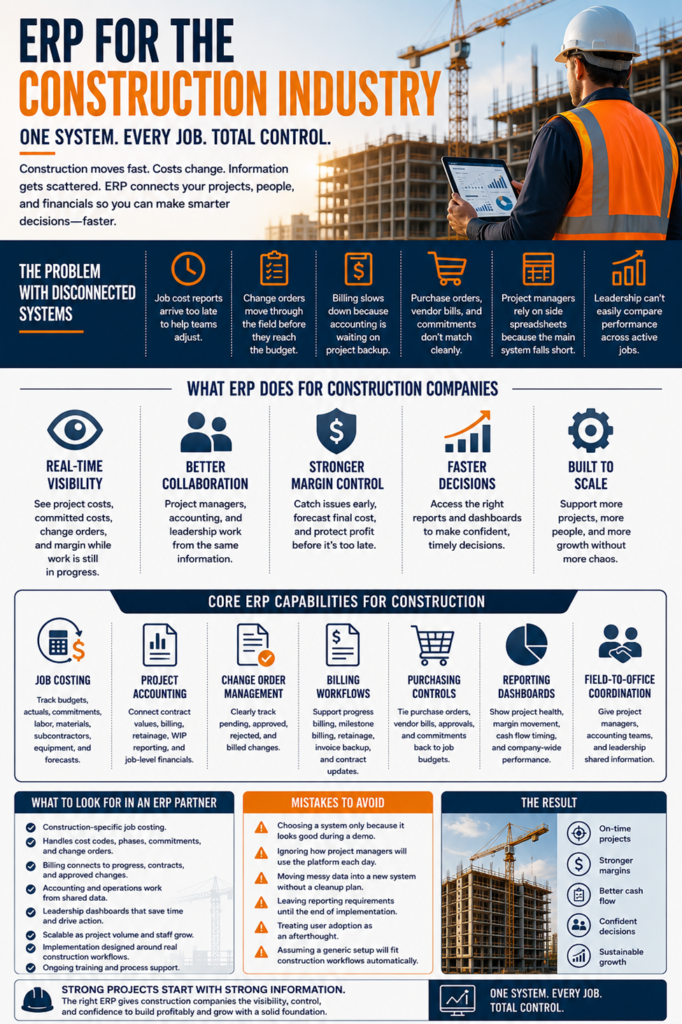
Common signs of system trouble include:
- Job cost reports arrive too late to help project teams adjust.
- Change orders move through the field before they reach the budget.
- Billing is slowing down because accounting is waiting on the project backup.
- Purchase orders, vendor bills, and commitments don’t match cleanly.
- Project managers rely on side spreadsheets because the main system falls short.
- Leadership can’t easily compare performance across active jobs.
This is where construction industry ERP software can give contractors a cleaner structure. Instead of letting each department create its own version of the truth, ERP helps connect project work with financial information. The result is not perfection, because construction is still construction. The result is better control, greater visibility, and fewer surprises lurking in disconnected workflows.
Core Features Construction Companies Should Expect From ERP
A construction ERP system should support the way contractors actually work. It should not feel like generic business software with a few construction terms added to the menu. Contractors need job-based financial control, clear reporting, billing support, purchasing visibility, change order tracking, and workflows that help both the office and field.
Job costing is one of the most important features. The system should track original budgets, revised budgets, actual costs, committed costs, labor, materials, subcontractors, equipment, overhead, and forecasted cost exposure. Project teams need a clear view of where each job stands before small issues grow into larger margin problems.
Project accounting is also essential. Construction companies need to manage progress billing, retainage, WIP reporting, revenue recognition, vendor invoices, purchase orders, contract values, and job-level reporting. Accounting can’t be separated from project activity because every job decision eventually affects the financial picture.
Change order management deserves special attention. Contractors should be able to track potential, pending, approved, rejected, and billed change orders in a clean workflow. If change orders are scattered across email threads or documents, the company can lose track of revenue, cost exposure, and margin protection.
Important ERP features should include:
- Job costing that tracks budgets, actuals, commitments, labor, materials, subcontractors, equipment, and forecasts.
- Project accounting that connects contract values, billing, retainage, WIP reporting, and job-level financial data.
- Change order management that clearly tracks pending, approved, rejected, and billed changes.
- Billing workflows that support progress billing, milestone billing, retainage, invoice backup, and contract updates.
- Purchasing controls that tie purchase orders, vendor bills, approvals, and commitments back to job budgets.
- Reporting dashboards that show project health, margin movement, cash flow timing, and company-wide performance.
- Field-to-office coordination that gives project managers, accounting teams, and leadership shared information.
A good ERP platform should make daily work easier to manage, not harder to understand. Project managers need quick job visibility. Accounting needs cleaner inputs. Billing teams need support. Leadership needs trustworthy reporting. Purchasing needs controls that don’t slow everything down. The system should support those needs without forcing the business into workflows that don’t fit construction.
Strong ERP also helps companies scale. A contractor running a handful of projects may survive with manual processes for a while. A growing contractor with more projects, staff, vendors, and reporting pressure needs a stronger foundation. ERP gives that growth a better structure.
How ERP Supports Better Job Costing And Margin Control
Job costing is the heartbeat of construction financial control. A contractor can sell plenty of work and still struggle if job margins are unclear. The challenge is that the margin doesn’t usually disappear in one dramatic moment. It slips through labor overruns, missed commitments, slow change order approvals, material cost changes, billing delays, and reporting gaps.
ERP helps by connecting budgeted, actual, and committed costs, change activity, and forecasts. Project teams can see what has already been completed and what remains to be done. That kind of visibility matters because contractors need to act before a project is already too far off track.
A job cost report that arrives after closeout may explain what happened, but it won’t help the team protect the job while work is still active. Real value comes from seeing cost movement earlier. If labor is trending higher than expected, the team can dig into the reason. If committed costs are pushing a phase over budget, project managers can respond before the invoice arrives. If change orders are pending too long, leadership can see the exposure.
ERP supports better job costing through:
- Budget versus actual visibility while the job is still moving.
- Committed to cost tracking before vendor bills arrive.
- Labor, material, subcontractor, equipment, and overhead cost views.
- Forecasting helps estimate the final cost and final margin.
- Cleaner cost code structures for better reporting.
- Historical job data that can improve future estimates.
Software doesn’t replace strong project management. It gives project managers better information to manage with. Experience still matters. Field judgment still matters. Communication still matters. ERP simply reduces the fog around the numbers so better decisions can happen faster.
Why Accounting And Operations Need A Shared View
Construction accounting and operations are tightly tied together. A schedule delay can affect billing. A change order can affect cost, revenue, and cash flow. A vendor invoice can shift job margin. Retainage can affect collections. A late field update can slow the billing team. Every part of the business touches another part, which is why disconnected systems cause so much friction.
If project managers and accounting teams work from different information, both sides lose time. Accounting may spend hours chasing backup, correcting entries, or reconciling reports. Project managers may feel like financial reports don’t reflect what’s happening in the field. Leadership may end up waiting on manual summaries because the system can’t show the full picture.
A shared ERP view helps reduce that tension. Purchase orders, vendor bills, labor data, change orders, billing activity, project records, and financial reports can connect to the same operating foundation. That gives each team a better context and reduces the need for constant back-and-forth.
For accounting teams, this can mean less duplicate entry, cleaner approvals, stronger billing support, and fewer manual reconciliations. For project managers, it can mean more reliable cost reports and clearer insight into commitments, change orders, and forecasted margin. For leadership, it can mean stronger reporting across jobs, divisions, teams, and time periods.
Contractors reviewing construction ERP software should look carefully at how well the system connects accounting and operations. If the platform helps one department but leaves the other stuck in manual work, it may not solve the deeper issue. Construction companies need shared visibility because project decisions and financial outcomes are too closely linked to manage separately.
A shared view also improves accountability. Teams can see where information belongs, who owns each step, and what needs attention. That kind of structure helps the business move faster without relying on constant emergency follow-ups.
How Contractors Should Compare ERP Options
ERP selection should start with workflow clarity. A contractor needs to know what is broken, what is slow, what is manual, and what information leadership needs more often. A feature list can look impressive, but features only matter if they support the way the company actually works.
The best ERP software for construction industry teams should help the business gain control without creating unnecessary complexity. That means it should support job costing, project accounting, billing, purchasing, change orders, reporting, and team adoption in ways that fit construction operations. A system that looks good in a demo may still fall short if it can’t handle the contractor’s real job structures, approval paths, cost codes, and reporting needs.
Contractors should start with practical questions. How are jobs structured now? Which cost reports are trusted? Where does billing slow down? Which teams rely on side spreadsheets? What information does leadership ask for repeatedly? Which data points are hard to confirm? These answers can help shape the ERP evaluation before vendors start showing screens.
Useful comparison questions include:
- Does the system support construction-specific job costing?
- Can it handle cost codes, phases, commitments, and change orders?
- Does billing connect to project progress, contract terms, and approved changes?
- Can accounting and operations work from shared data?
- Can leadership see useful dashboards without heavy manual reporting?
- Will the system scale as project volume and staff increase?
- Does the implementation plan reflect real construction workflows?
- Will the team receive enough training and process support?
Contractors should also think about adoption. A system can be powerful and still fail if the team doesn’t use it properly. Project managers need workflows that make sense. Accounting needs accuracy and control. Leadership needs reports it can trust. Field teams need processes that don’t create unnecessary friction.
The right ERP decision is not just about choosing software. It is about choosing a stronger operating model for the business.
Common ERP Selection Mistakes Contractors Should Avoid
A common mistake is choosing ERP based only on a polished sales demo. Demos are designed to look clean, fast, and easy. Real construction operations are messier. Contractors need to know how the system handles actual cost structures, billing rules, change orders, vendor workflows, approvals, reporting needs, and project complexity after the software goes live.
Another mistake is treating implementation like a quick technical task. ERP requires more than moving data from one platform to another. It often involves workflow cleanup, reporting decisions, user training, data mapping, permissions, approvals, and process alignment. If those pieces are rushed, the company may end up with a new system that carries over old problems.
Contractors should also avoid copying broken workflows into the new ERP. If the current process depends on duplicate entry, late reporting, side spreadsheets, and unclear ownership, repeating that structure inside a new platform won’t fix the core issue. ERP should be a chance to clean up how the business operates.
Mistakes to avoid include:
- Don’t choose a system only because it looks good during a demo.
- Don’t ignore how project managers will use the platform each day.
- Don’t move messy data into a new system without a cleanup plan.
- Don’t leave reporting requirements until the end of implementation.
- Don’t treat user adoption as an afterthought.
- Don’t assume a generic setup will fit construction workflows automatically.
ERP success depends on fit, process design, implementation discipline, and adoption. The software matters, but the way the company prepares for it matters just as much.
Frequently Asked Questions About ERP For The Construction Industry
What Is ERP For Construction?
ERP for construction is a connected business system that helps contractors manage job costing, accounting, billing, purchasing, project activity, reporting, and financial visibility in one place. Instead of forcing each department to work from separate tools, ERP gives teams a cleaner way to share information. For contractors, that can mean fewer spreadsheet gaps, faster reporting, and better control over active jobs.
What Features Should Construction ERP Include?
Construction ERP should include job costing, project accounting, change order tracking, purchasing, billing workflows, WIP reporting, dashboards, document support, and field-to-office coordination. The system should help teams compare budgets, committed costs, actual costs, and forecasts. A strong setup should support project managers, accounting teams, billing teams, and leadership without forcing everyone to rebuild reports manually.
How Does ERP Help With Job Costing?
ERP helps with job costing by connecting budgets, cost codes, commitments, actual costs, labor, materials, subcontractors, and change orders. That gives project teams a clearer view of margin movement while the job is still active. It also helps leadership compare performance across projects and use historical job data to improve future estimates.
Can ERP Improve Construction Billing?
ERP can improve construction billing by connecting project progress, contract values, approved change orders, retainage, and invoice backup. This helps accounting teams bill with cleaner support and fewer delays. It can also reduce the back-and-forth between project teams and the office because the information needed for billing is easier to find and confirm.
Is Construction ERP Better Than Spreadsheets?
Construction ERP is usually better than spreadsheets for contractors that need stronger control, shared data, and faster reporting. Spreadsheets can work in the early stages, especially for smaller teams with fewer jobs. As project volume, billing complexity, vendor activity, and reporting needs increase, ERP provides contractors with a more reliable framework for managing growth.
When Should A Contractor Consider ERP?
A contractor should consider ERP when job cost reports are late, billing takes too much manual work, project managers don’t trust the numbers, or leadership struggles to see company-wide performance. ERP also makes sense when teams are creating side spreadsheets because current systems don’t answer basic business questions. Those signs usually mean the company has outgrown its current tools.
Does ERP Help With Construction Cash Flow?
ERP can help with construction cash flow by improving billing accuracy, tracking retainage, linking project progress to invoicing, and providing leadership with better visibility into costs and revenue timing. It won’t fix every cash flow issue on its own, but it can reduce delays caused by missing data, disconnected workflows, and manual billing processes. Cleaner billing and cost visibility can help contractors make stronger cash flow decisions.
What Makes Construction ERP Different From Regular Accounting Software?
Construction ERP is built around job-based financial control, while basic accounting software often focuses on general bookkeeping. Contractors need to manage project budgets, cost codes, commitments, change orders, WIP, retainage, progress billing, and job-level reporting. Regular accounting tools may handle transactions, but they often fall short once contractors need deeper project visibility.
How Should Contractors Choose The Right ERP System?
Contractors should choose an ERP based on workflow fit, job-costing depth, billing needs, reporting requirements, accounting structure, team adoption, and long-term scalability. A polished demo is not enough. The system needs to support the company’s processes for estimating, buying, building, billing, forecasting, and reporting across real construction projects.